
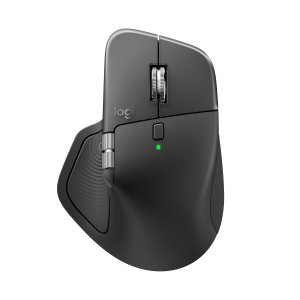
[Expired]New Release:Logitech MX Master 4
- Logitech now offers Logitech MX Master 4 business mouse, priced at $119.99.
- Logitech official website, save up to $100 when purchasing selected bundles.
- Receive a free MX travel case.
- Free shipping within the United States.
- Buy>>
Editor's Pick: Logitech's newly released MX Master 4 continues the flagship positioning of the MX series mice while bringing numerous innovations to the interactive experience. It introduces haptic feedback for the first time, allowing users to feel subtle vibration cues when scrolling, gesturing, or selecting, enhancing the immersive experience. Additionally, the MX Master 4 features the new Actions Ring interface, enabling users to pull up a circular menu anywhere on screen for quick access to frequently used tools or commands, greatly improving productivity and operational efficiency. It still comes equipped with the MagSpeed electromagnetic scroll wheel and an 8000 DPI high-precision sensor that tracks smoothly on almost any surface, including glass.

Compared to its predecessor, the MX Master 4 offers numerous detailed improvements. Logitech claims its silent clicking is 90% quieter than the MX Master 3, making it more suitable for shared offices or quiet environments. The wireless connection stability has also been optimized with the new-generation USB-C Logi Bolt receiver and improved antenna design, providing faster and more stable connections with better signal interference resistance. Battery life remains excellent, lasting up to 70 days on a single charge, with fast-charging support—just 1 minute of charging provides 3 hours of use. Logitech also emphasizes its modular structure and eco-friendly design, using a higher percentage of recycled plastic for easier long-term maintenance and recycling.

Overall, the MX Master 4 is more of a "comprehensively enhanced version" of the MX Master 3S rather than a complete reinvention. For professional users already accustomed to the MX series, improvements in interaction methods (haptic feedback + shortcut ring), quiet performance, and connection stability will provide a smoother user experience. However, if you already own an MX Master 3S and don't particularly need these new features, the upgrade appeal might be limited. For new users seeking a top-tier productivity experience, the MX Master 4 is one of the most worthy flagship office mice available today.


问大家
: How is the button feedback? 按键反馈怎么样?
最新评论 14
: Forget about the 125Hz polling rate for a moment. As an office-focused mouse, it doesn't even have onboard memory. If I can't install your crappy software on my company computer, what's the point of this mouse? 先不谈路边125hz,一个主打办公的鼠标没有板载内存我就问问在公司电脑里没法下载你那b软件,这鼠标有什么用
: It's even quieter than the previous generation, but it feels more slippery in hand compared to earlier versions. Holding it gives a sensation like practicing Tai Chi without being able to make a bird fly—nowhere to exert force. 比上代还安静的,但是上手比之前的代都偏滑,握起来感觉打太极鸟不飞的感觉,无处着力。
: One GPW outshines all office mice. 一个gpw 吊打所有办公鼠标
: No electromagnetic scroll wheel. Once you've used it for browsing code or Excel sheets, you can't go back without it... 没有电磁滚轮,这个浏览代码,excel sheet,用过就离不开。。
回复 @匿名用户 : Logitech's GPW is great, but many domestic GPW models are also quite good. 罗技的gpw 不过很多国产的gpw也不错
: My 3S micro switch broke, so I bought a new one from Mainland China for just over ten yuan and soldered it on myself to use. 我的3S微动都坏了,自己国内十几块买了个新的焊上去用
: Indeed, that one seems prone to breaking; mine broke too. At first, it started double-clicking, and then it stopped working altogether. I spent 10 yuan in Mainland China to buy a micro switch, replaced it, and now it works again. 的确那个好像容易坏,我的也坏了,刚开始连键,之后直接不管用了。国内花了10块钱买了微动,换上又能用了
: 125Hz polling rate, DPI can only be adjusted via a slider without precise control. Certified as a cheap knockoff. 125hz,dpi只有个滑块不能精确调,鉴定为路边一条
: I really can't understand why they insist on 125Hz polling rate. Most monitors are 4K now, shouldn't professional tools also enjoy smooth performance? If it's due to battery concerns, at least give users the option to choose between 125-1000Hz. polling rate 我真是打死都想不通为什么坚持 125hz,现在大多都是 4k 屏了,难道专门工作的工具就不应该享受流畅吗,如果是因为电池至少给个选择可以自己选 125-1000 啊
: I don't get it either. With my own ROG mouse, the battery life is basically the same at 125Hz and 500Hz. It only gets noticeably worse when you crank it up to 1000Hz. 我也是不懂 我自己的 rog 鼠标实测 125hz 和 500hz 的续航基本没区别 只有拉到 1000 才会明显变差
: Family Heirloom 125 祖传125
: How is the button feedback? 按键反馈怎么样?